Captions that stop the scroll: how the top creators do it
The font, size, outline, and timing behind captions that stop the scroll — the real numbers, why each one matters, and how to get the same premium look in one click instead of rebuilding it every video.

There are captions, and there are captions that stop the scroll. The gap between them is not effort — it is a specific set of decisions that high-performing creators make once and reuse forever.
Here is the whole recipe, for a 9:16 clip on TikTok, Reels, or Shorts:
- Font: a heavy sans-serif — Anton, Montserrat Bold, or Archivo Black
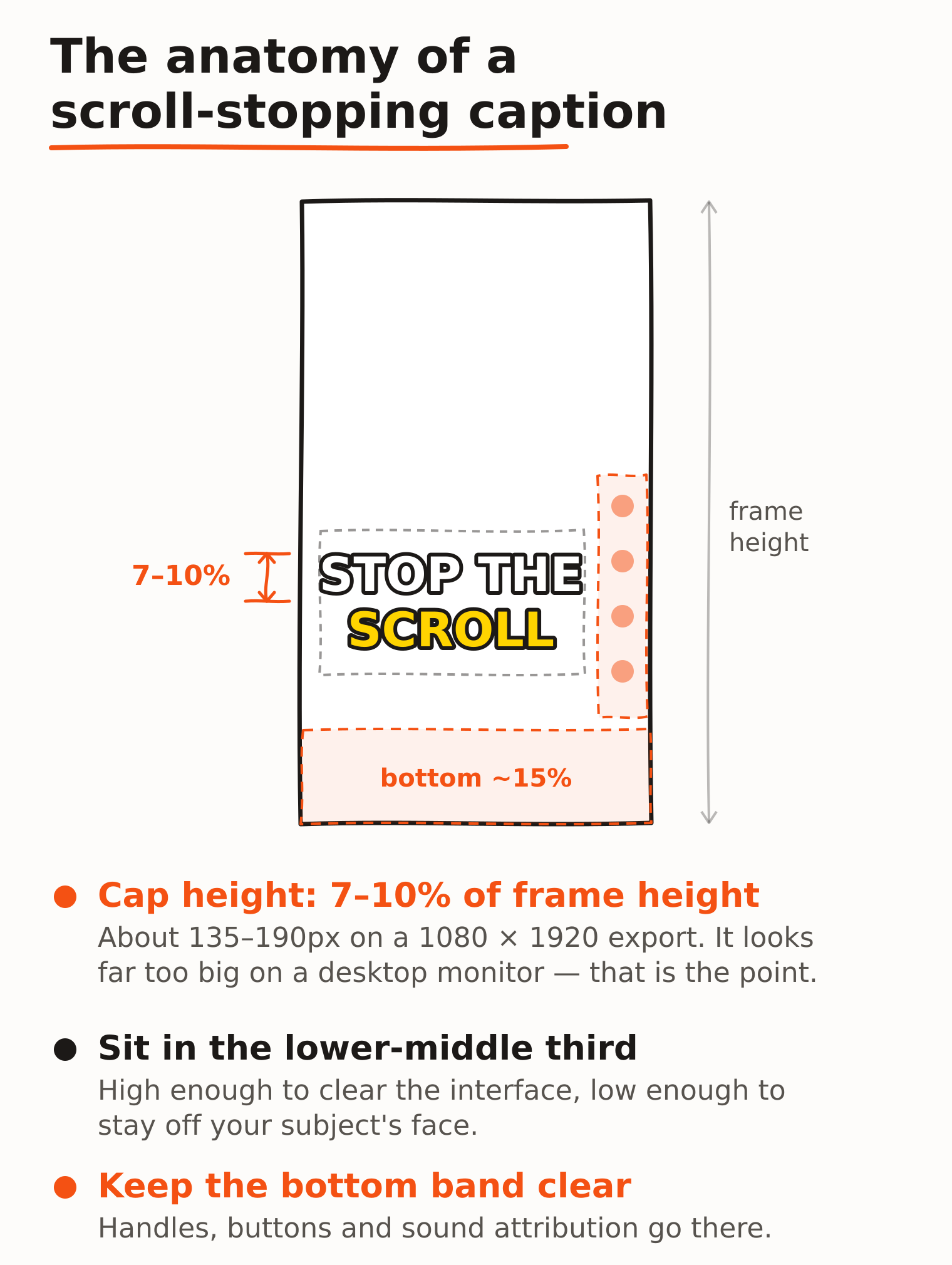
- Size: 7–10% of the frame height
- Colour: white, or yellow for high-energy content
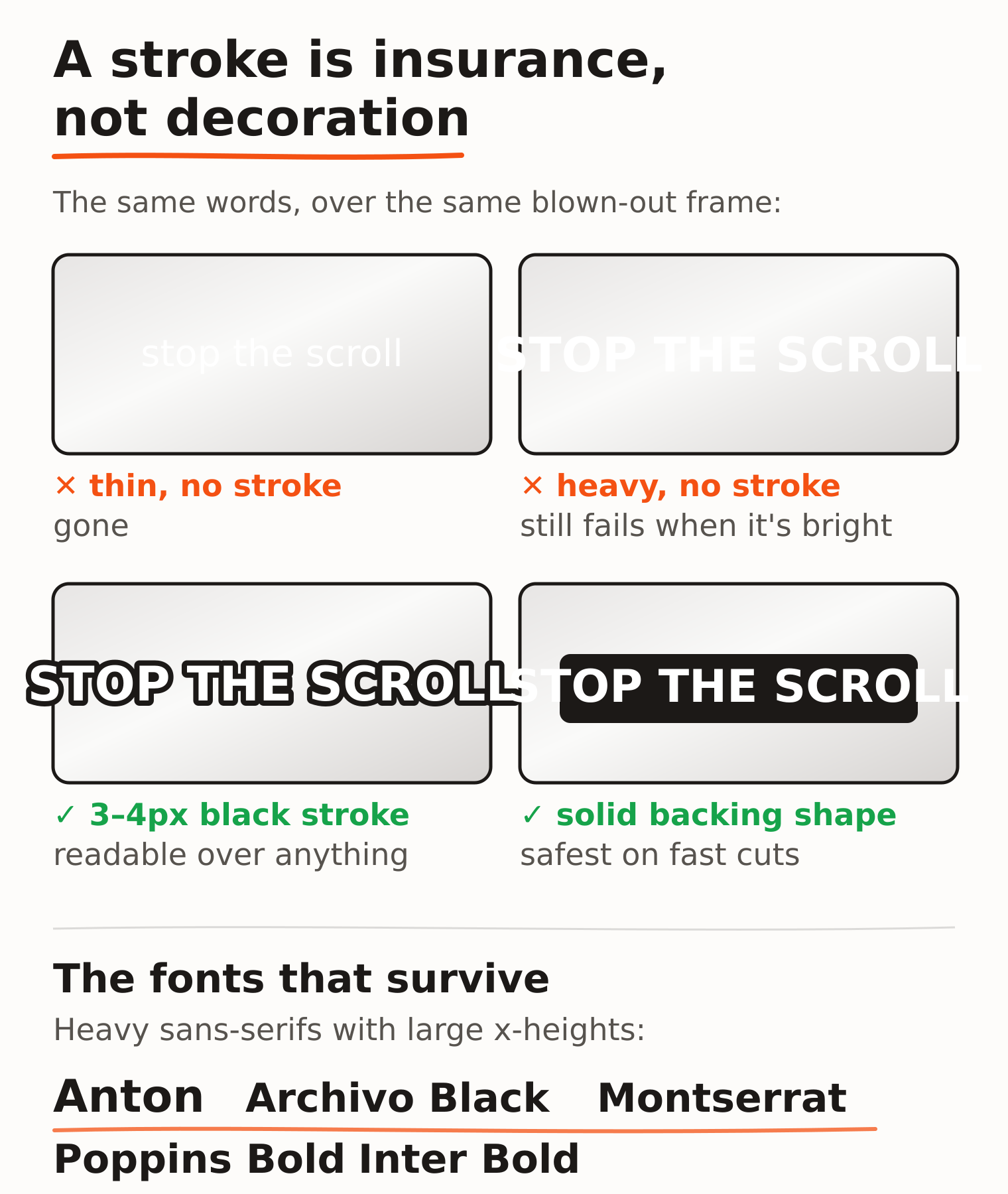
- Outline: a 3–4px black stroke, or a solid backing shape
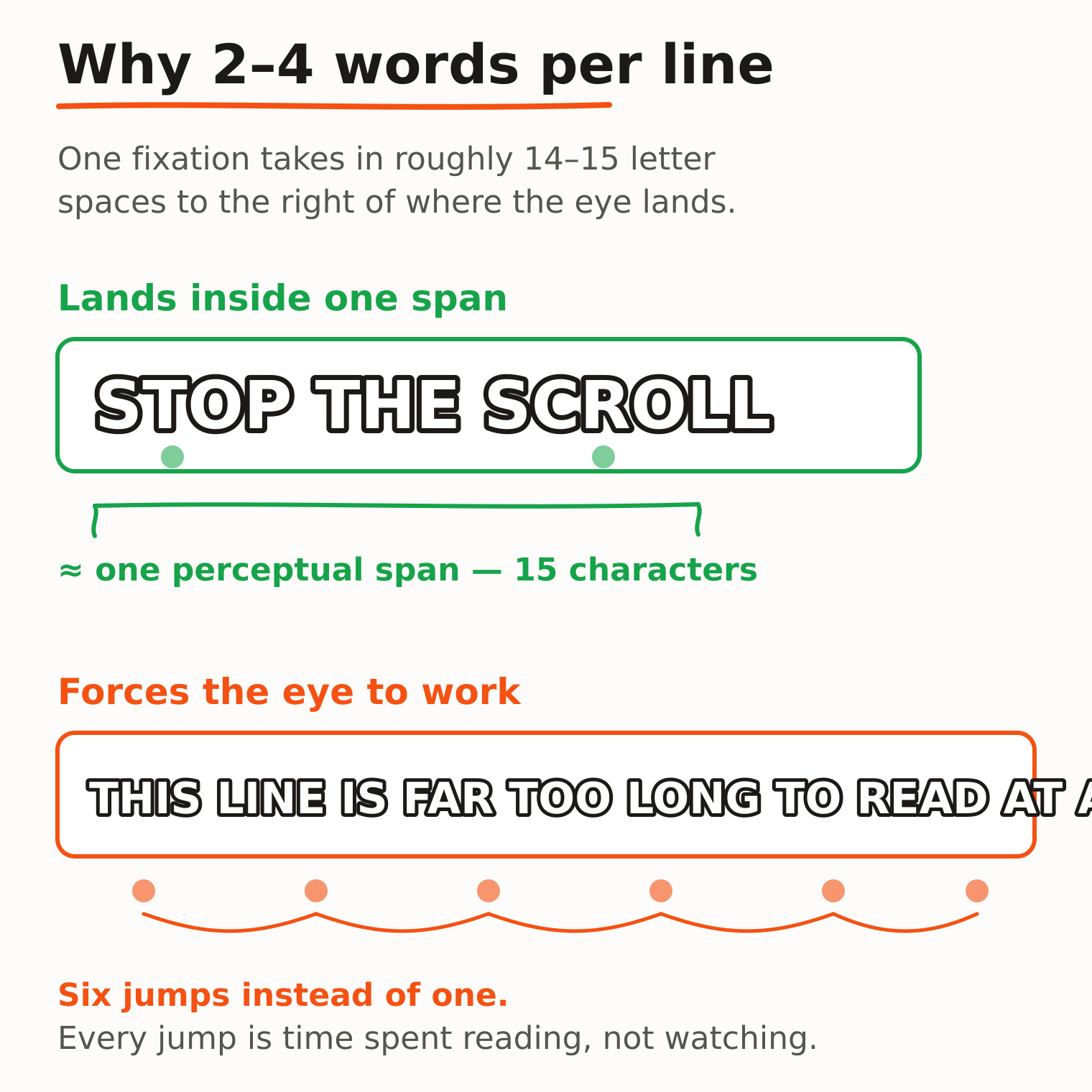
- Line length: 2–4 words, one or two lines, never three
- Position: lower-middle third, clear of the bottom 15%
- Timing: word by word, not sentence by sentence
That is what separates a premium caption from a default one. The rest of this post is why each number is what it is — and why you should never have to set any of them by hand.
Why platform auto-captions never stop the scroll
TikTok, Instagram, and YouTube will all caption your video for free, instantly. They are also the reason so much short-form video looks identical: the same font, the same position, the same grey box as everyone else in the feed.
That is the actual problem. A caption is the first thing a scrolling viewer reads, usually with the sound off. If it looks like every other clip, it has already lost. Generic captions do not just fail to help — they actively signal that a video was uploaded rather than made.
Premium captions do the opposite. They are the visual signature that makes someone stop, and by the third video, the thing that makes them recognise you.
The numbers, and why they are those numbers
Size: 7–10% of frame height. On a 1080×1920 export that is roughly 135–190px of cap height. It looks absurdly large on a desktop monitor and correct on a phone. This is the most common mistake by a distance: styling captions at the size that looks balanced in your editor, on a 27-inch screen, then shipping something unreadable on the device it was made for.
Outline: 3–4px black stroke. Not decoration — insurance. Your subject will walk past a window, the sky will blow out, a white wall will fill the frame. Pure white text with no stroke fails somewhere in almost every clip. A stroke or a solid backing shape guarantees contrast against a background you do not control.
Line length: 2–4 words. This one has real reading science behind it. A skilled reader's perceptual span — how much text a single eye fixation actually takes in — is about 3–4 letters to the left of fixation and 14–15 letter spaces to the right (Rayner, Slattery & Bélanger, 2010). A two-to-four word caption sits close to that window, so it is absorbed in one or two fixations. A long line is not: the eye has to make a series of jumps across it, and every jump is time spent reading instead of watching.
Professional subtitling settled on the same constraint from the other direction. Netflix's English Timed Text Style Guide caps subtitles at 42 characters per line, maximum two lines, with a reading speed ceiling of 20 characters per second for adult programming. Short-form goes tighter still, because the viewer is also watching a face, a cut, and a moving background.
If your captions wrap to three lines, they are too long — the fix is fewer words per cue, not smaller text.
Position: lower-middle third. High enough to clear the platform interface — usernames, buttons, progress bars all live in the bottom band — and low enough to stay off your subject's face. Preview in a phone-shaped frame, not a desktop window, or you will not see the collision until it is public.
Font: a narrow band of survivors. Text over video is text over an unpredictable, moving, badly-lit background. Thin weights disappear against bright frames. Serifs lose their fine strokes on a phone. Script faces are unreadable at speed. What survives is heavy geometric and grotesque sans-serifs with large x-heights: Anton, Archivo Black, Montserrat Bold, Poppins Bold, Inter Bold.
Word-by-word timing is the premium signal
Once the typography is right, timing granularity is the biggest remaining difference — and it is the one viewers feel without being able to name.
Sentence-level captions drop a block of text and leave it sitting there. The eye reads it in half a second and then has nothing to do. Word-level timing reveals words roughly as they are spoken, so the caption stays locked to the voice and the eye keeps moving.
This is what people mean by "karaoke captions". It needs a start and end time per word, not per line. It is also the single most tedious thing to do by hand: nudging individual words along a timeline, per cue, per video, forever. It is exactly the kind of work that should be automatic.
Get this look in one click
You should not have to set any of these by hand. CakeCut applies premium creator captions — word-level timing, styles that stop the scroll — to your video in one click.
What premium actually looks like
Two real CloudCap renders, at opposite ends of the range.

High-energy. Yellow on a black outline is the highest-contrast pairing available, and the mixed weights — a small script kicker over a heavy display word — create hierarchy inside a two-word caption. This is a scroll-stopper for hooks and punchlines. It would be exhausting across four minutes of talking head.
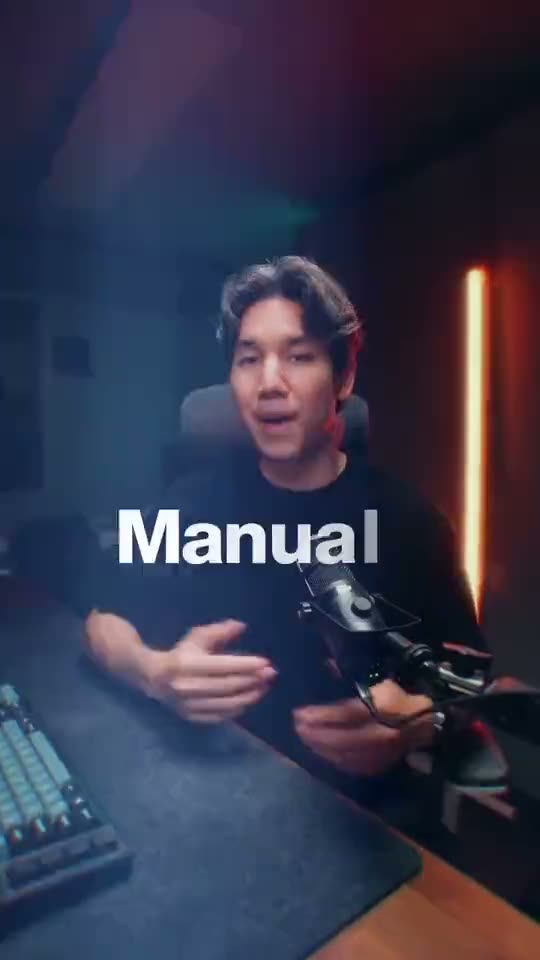
Restrained, and quietly the more technical of the two. Clean white bold sans, no colour — and the text sits behind the subject, so his shoulder passes in front of the word. That depth cue makes the caption feel composited into the scene rather than pasted on top, and it keeps the face unobstructed without moving the text off-centre.
Neither of these is something you would assemble by hand for every upload. Both are one click.
Match the energy, then stop deciding
- Fast cuts or busy backgrounds — use a solid backing shape instead of a stroke. An outline is not enough when the background changes every 400ms.
- Quiet, serious content — aggressive animated captions read as tonally wrong. Restraint is also a style.
- Non-Latin scripts — check the font has the glyphs. Many display faces are Latin-only and the fallback will not match your weight.
- Long words — German, Finnish, and technical vocabulary break the 2–4 word rule. Fewer words per line, not smaller text.
Every one of these is a decision you should make once. The real cost is not making it — it is re-making it, per video, forever, and ending up with a slightly different look every time.
Premium captions, in one click
This is the part CloudCap exists for. You bring a finished clip and get premium creator captions in one click: word-level timing already applied, a distinctive style already applied, ready to post.
The styles are real presets — including both of the ones above — so the twentieth video looks like the first. Nothing above needs to be configured, measured, or re-derived. When you do want control, the timing, layout, and per-word styling are all editable, and the caption box is a real box, so text cannot silently outgrow the frame.
You can translate captions when you want the same clip to reach a wider audience, and export either a captioned video ready to post or subtitle files like SRT, TXT, and JSON when you need the text separately.
It is not a video editor. If you need to cut, grade, or mix audio, keep doing that where you already do it. CloudCap picks up at the caption pass — the hour you would otherwise lose dragging words around a timeline, for a result that looks like everyone else's.
Sources
- Rayner, K., Slattery, T. J., & Bélanger, N. J. (2010). Eye movements, the perceptual span, and reading speed. Psychonomic Bulletin & Review, 17(6), 834–839. The perceptual span for skilled readers of alphabetic writing systems is 3–4 letters left of fixation and 14–15 letter spaces to the right. The paper also reports mean fixation durations of roughly 205–253ms and forward saccades of 6.2–8.9 letter spaces, with faster readers making longer saccades than slower ones.
- Netflix. English Timed Text Style Guide. Specifies 42 characters per line, a maximum of two lines, and reading speeds up to 20 characters per second for adult programming (17 for children's programming).
A note on the numbers that are not cited: the 7–10% cap height, the 3–4px stroke, and the lower-middle-third placement are conventions drawn from what consistently works on 9:16 mobile video, not published standards. Platform safe areas in particular shift with interface changes and caption length — the platforms distribute current safe-zone templates through their own ads tools, and those are the authority over any fixed pixel figure, including the ones in this article.